AI diagnostics that return the exact verified OEM part — not a guess.
Company overview, full product walkthrough & technology brief — for partners, the trade, and investors. Built by a service-industry owner for real field-service companies.
The wrong part is the most expensive thing on the truck.
A field tech's whole day is a chain of judgment calls — what failed, which exact part fixes it, what to quote. Get the part wrong and the job doesn't just slip: it doubles. A second truck roll, a callback, an apologetic phone call, and a day of margin gone. The metric that captures all of it is first-time fix rate (FTFR) — and a single wrong-part trip drags it down hard.
The repeat truck roll
Wrong part = drive back to the supply house, then drive back to the customer. Two extra trips against one billable visit.
The callback & the review
A misdiagnosis means an unhappy customer, a callback, and the risk of a one-star review that costs far more than the job.
The margin leak
Senior-tech knowledge lives in a few heads. Newer techs guess, restock wrong, and the shop eats the difference job after job.
The core gap: raw AI can name a likely component, but it cannot reliably hand a tech the exact part number for the exact model in front of them — and a part number that's almost right is worth nothing at the supply counter. That last mile, from "probably the drain pump" to "this specific verified OEM part fits this specific model," is exactly where the money is lost — and exactly where ServiceLens lives.
The moat
Raw AI names the part. It guesses the number.
A general model can tell you "it's the drain pump." Ask it for the part number for the exact model in front of you and it confidently invents one — roughly 0% right on the exact OEM part. ServiceLens returns the exact verified OEM part for the exact model — so techs never order the wrong part, and never drive back.
Raw AI — ungrounded
Names a component. Guesses the part #.
Plausible-sounding, frequently wrong. No tie to the actual model. No fault-code spec. No test step. The tech finds out at the supply house — or worse, at the customer's home.
model: WF45T6000AW part:DC97-XXXXX ← hallucinated
ServiceLens — grounded & verified
Returns the exact verified OEM part for the exact model.
Every answer is grounded in a verified corpus and dual-checked against that model. You also get the fault-code → cause → test-spec, so the diagnosis is provable before anyone drives.
model: WF45T6000AW part:DC97-16350W — Verified ✓ fits this model
~0%
Raw-AI accuracy on the exact OEM part number for the exact model
Never
order the wrong part — never drive back
FTFR ↑
a first-time-fix-rate & callback-reduction engine
Section · Product walkthrough
How it works, screen by screen.
Every screen that follows is the real, shipping product — not a mockup. We'll walk the whole loop a tech actually runs: from the cockpit, to the diagnosis, to the money shot (the part-first result), to the estimate, the saved-job flywheel, Ask Moe, and the connected office. For each screen we call out the feature — and why it beats the API-wrapper competition.
A
The cockpit
mobile-first + desktop dispatch
→
B
Diagnose
scan → symptom / code
→
C
The result
part-first & verified
→
D
Estimate
auto quote
→
E
History
the flywheel
→
F
Ask Moe
chat + diagrams
→
G
Connected
CRM & integrations
Walkthrough · A
The cockpit — mobile-first in the field, dispatch on the desk.
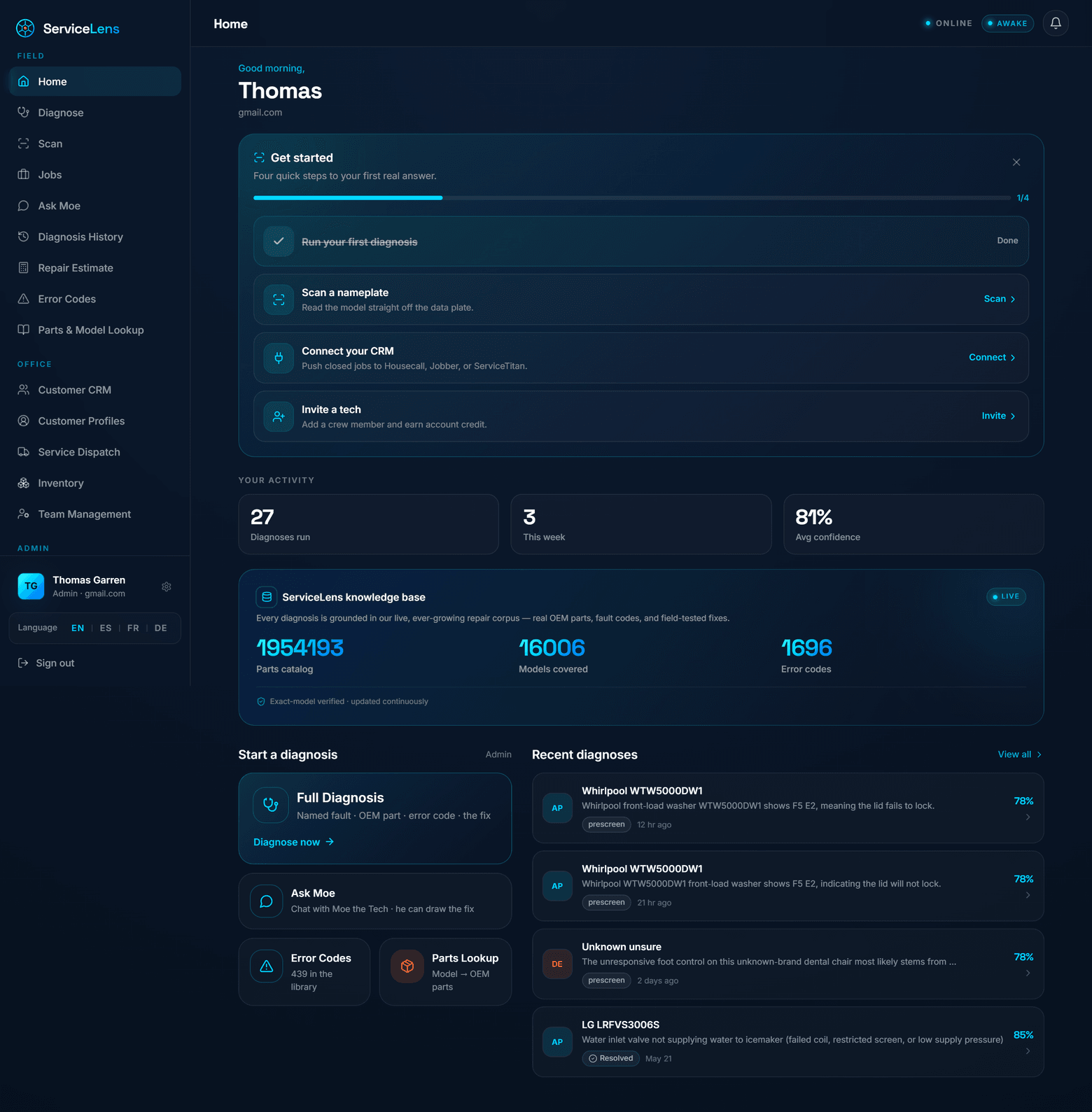
One home, two postures. On the phone it's a guided, thumb-reachable cockpit a tech opens at the curb. On desktop it's a dispatch board for the office — same data, same verified knowledge base, no second login.
diagbuddygo.com/app · Home
Desktop "Home" — dispatch cockpit: today's activity, the live knowledge base, and recent diagnoses with confidence.
1
Guided "Get started" onboarding
Run a diagnosis, scan a nameplate, connect a CRM, invite a tech — a shop is productive in minutes, not a multi-week rollout.
2
Today's activity at a glance
Diagnoses run, jobs this week, and average calibrated confidence — the dispatcher sees the floor's pulse instantly.
3
The knowledge base, live on screen
Parts catalog, models covered, and error codes shown right on Home — the depth is the product, so we surface it.
4
Recent diagnoses, each with a confidence score
Every job is one tap from a full report. Why it beats competitors wrapper tools dump a chat log; we give a structured, scored, re-openable job record.
The same brain, built for the truck
On a phone the cockpit collapses to a thumb-first layout with a bottom tab bar — Home, Diagnose, Scan, Jobs, Menu — so the most-used actions are always one reach away. The dark navy theme isn't just brand; it's battery-friendly for an all-day device and easy to read in a dim basement or a bright driveway.
Bottom-tab navigation sized for gloved thumbs, not a desktop menu shrunk down.
Same verified knowledge base and recent-job history as the desktop — no "lite" mobile gap.
Dark-mode by design — lower battery draw and glare-free in the field.
Mobile "Home" — the field cockpit, thumb-first with a bottom tab bar.
Walkthrough · B
Diagnose — nameplate scan → symptom or code.
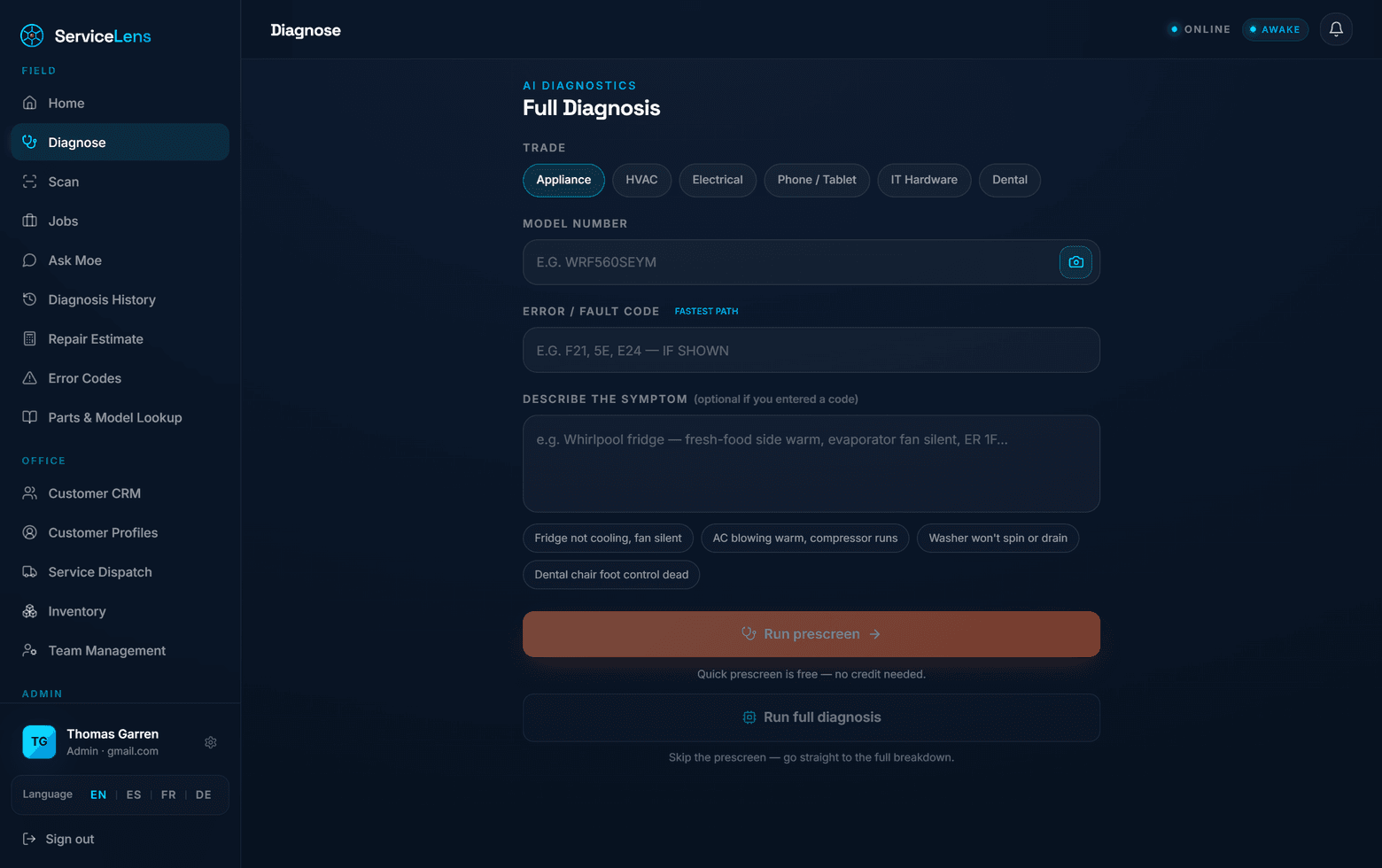
Diagnosis starts where the model lives: the nameplate. Snap the plate to capture the model, pick the trade, drop in a fault code (the fastest path) or describe the symptom in plain English — then run a free prescreen or go straight to the full breakdown.
diagbuddygo.com/app · Diagnose
"Full Diagnosis" — trade, model (with nameplate scan), fault-code fast path, symptom description, prescreen vs full.
1
Pick the trade first
Appliance, HVAC, Electrical, Phone/Tablet, IT Hardware, Dental — the router scopes to the right corpus from the first tap.
2
Nameplate Snap Scan (the camera icon)
OCR the plate → exact model identity. Why it beats competitors the model is the key to the whole verified corpus; getting it right is what makes the part right.
3
Fault / error code = the fastest path
A code (F21, 5E, E24…) jumps straight to mapped cause → part → test. 2,200+ appliance codes mapped, 663 HVAC fault codes live.
4
Plain-English symptom with smart examples
"Fridge not cooling, fan silent" works as well as a code — example chips prime the field tech who's unsure where to start.
5
Free prescreen, then full diagnosis
Quick prescreen costs no credit — perfect for the office to triage before dispatch. Why it beats competitors a built-in office→tech pre-screen most rivals simply don't have.
Identical flow on the phone
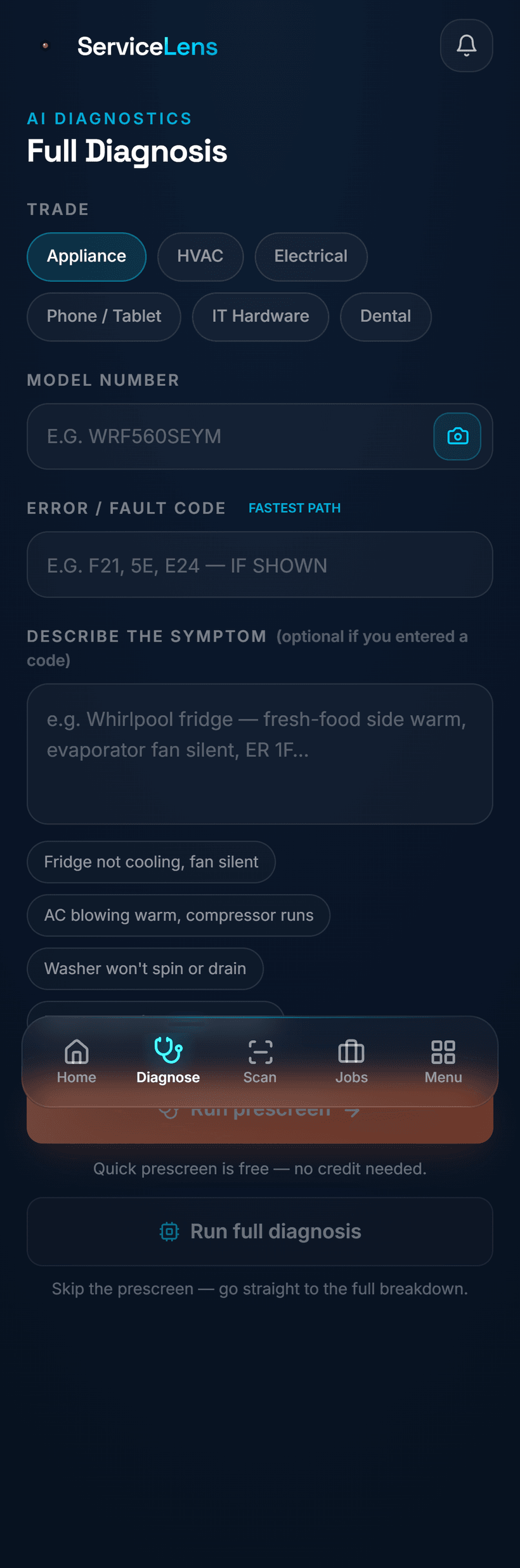
The same trade selector, scan, code field, and symptom box collapse cleanly onto a phone — so a tech standing at the unit runs the exact diagnosis the office would, without learning a different screen. Voice is deliberately absent: a tech tapping a quiet screen looks professional in a customer's home, where a voice assistant would not.
Scan at the unit — capture the plate without typing a long model number by hand.
Code-first or symptom-first — whichever the tech has, the flow adapts.
Silent by design — no voice, no awkward talking-to-an-app in the customer's kitchen.
Mobile "Full Diagnosis" — the same flow at the unit, silent and thumb-first.
Walkthrough · C
The money shot
The result — part-first, verified, ready to order.
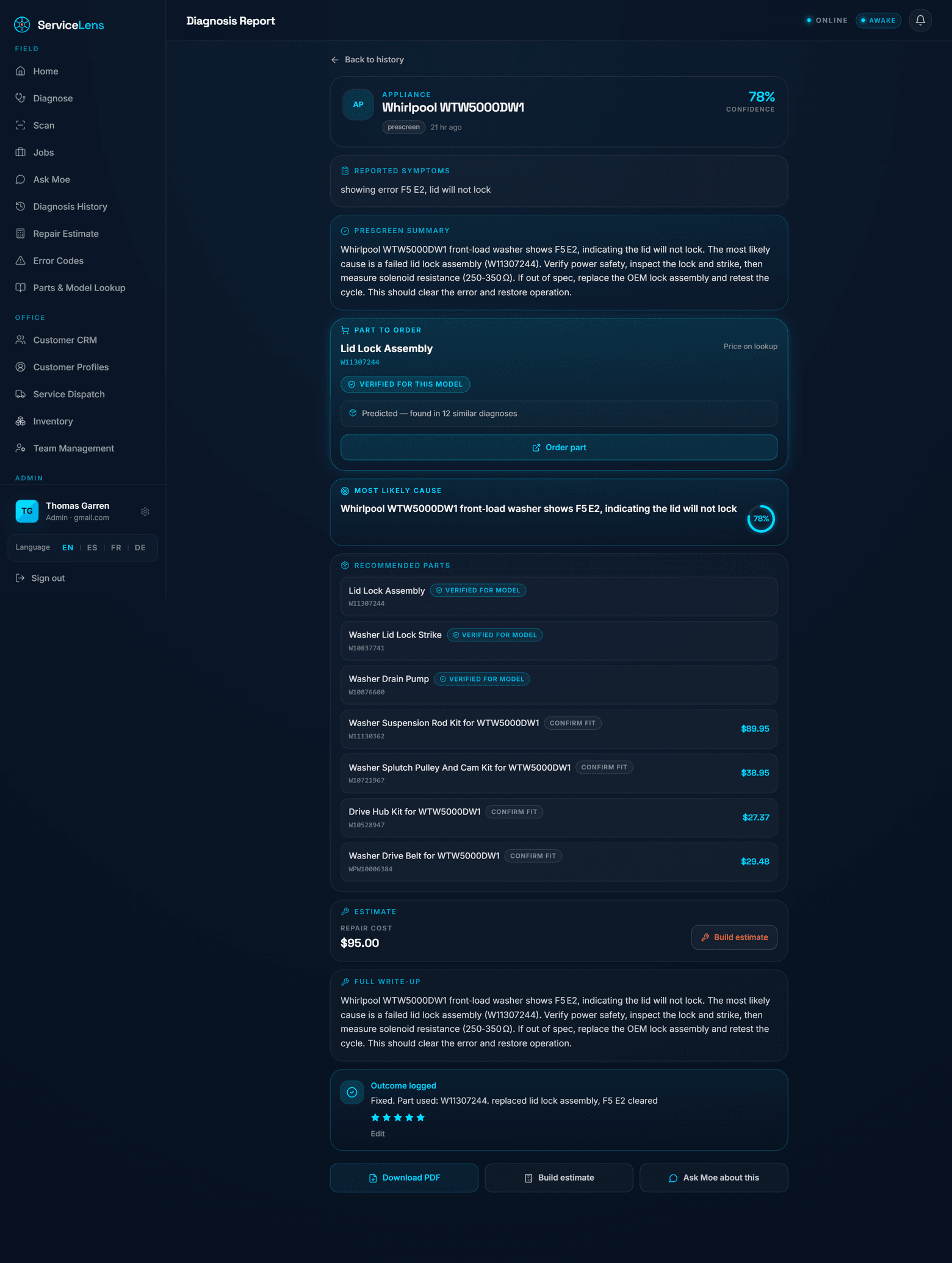
This is the screen the whole product exists to produce. We don't bury the part under paragraphs of prose — we lead with it. The first thing a tech sees is the exact OEM part to order, badged Verified for this model, with the cause, the test, the priced parts list, the estimate, and the close-the-loop write-up all underneath. This is the moat, on screen.
diagbuddygo.com/app · Diagnosis Report
"Diagnosis Report" — part-first: the verified part to order leads, then cause, priced parts, estimate, and the logged outcome.
1
"Ready to order" leads the page
The exact OEM part (e.g. Lid Lock Assembly) is the hero, with an Order part button right there. Why it beats competitors the part is the moat, so the part comes first — not buried in chat.
2
"Verified for this model" badge
Dual verification flags each part Verified or Confirm-fit against the model's corpus — so a tech knows exactly how much to trust the number before they order.
3
Confidence score on the report
A calibrated confidence (e.g. 78%) sits on the header — the model knows what it knows, and says so.
4
Cause + test-spec, provable
Reported symptoms, most-likely cause, and the test to confirm it — the diagnosis is provable before anyone drives or orders.
5
Recommended parts, each priced & badged
A ranked parts list with OEM pricing grounded in the verified corpus, every line carrying its own Verified / Confirm-fit flag.
6
"Outcome logged" closes the loop
The tech records what actually fixed it (with a rating). Why it beats competitors that confirmed fix feeds the self-improving flywheel — a wrapper tool forgets the job the moment the chat closes.
The whole report in a tech's hand
On the phone, that same part-first report stacks into a single scroll: the verified part and Order part first, then cause, the priced parts list, the auto-estimate ($95.00 · Build estimate), the full write-up, and the outcome-logged card. One screen carries the job from "what's wrong" to "ordered, quoted, and closed."
Lead with the part
No scrolling past prose to find the number — it's the first thing on screen.
One-tap actions
Order part · Build estimate · Download PDF · Ask Moe — all from the report.
Mobile "Diagnosis Report" — the entire part-first job in one scroll.
Walkthrough · D
Auto-estimate → customer-ready quote.
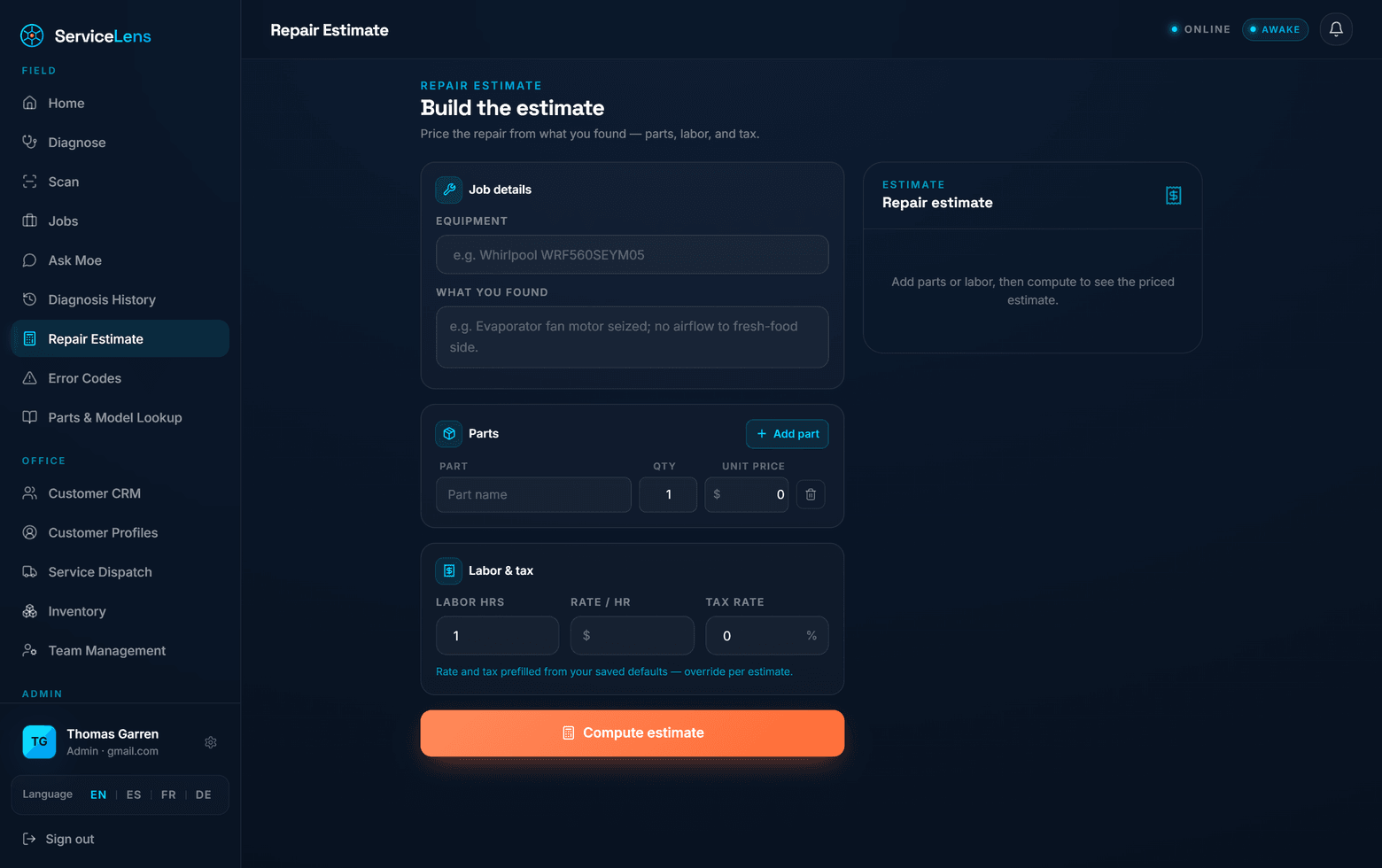
Diagnosis flows straight into money. From "what you found," ServiceLens builds a priced estimate — parts (with OEM pricing grounded in the verified corpus), labor, and tax — that becomes a quote you can share or push to your CRM. The numbers a shop charges most are pre-filled from saved defaults, so a quote is seconds, not paperwork.
diagbuddygo.com/app · Repair Estimate
"Build the estimate" — job details, parts, labor & tax (pre-filled from saved defaults), then Compute estimate.
1
Carries the diagnosis forward
Equipment and "what you found" come straight from the report — no re-typing the job to price it.
2
Parts priced from the verified corpus
Add the recommended OEM parts with quantities and unit prices. Why it beats competitors the pricing is grounded in the same verified parts data that produced the diagnosis — not a guess.
3
Labor & tax pre-filled from saved defaults
Rate and tax come from the shop's saved settings and can be overridden per estimate — fast, consistent quotes.
4
Compute → customer-ready
One click produces the priced estimate, ready to share as a quote link or push into the connected CRM.
The economic loop closes here. A tech walks in, diagnoses, prices, and quotes — without a back-office round trip. One avoided second-trip pays for the whole seat, many times over.
Walkthrough · E
Every job saved — and the self-improving flywheel.
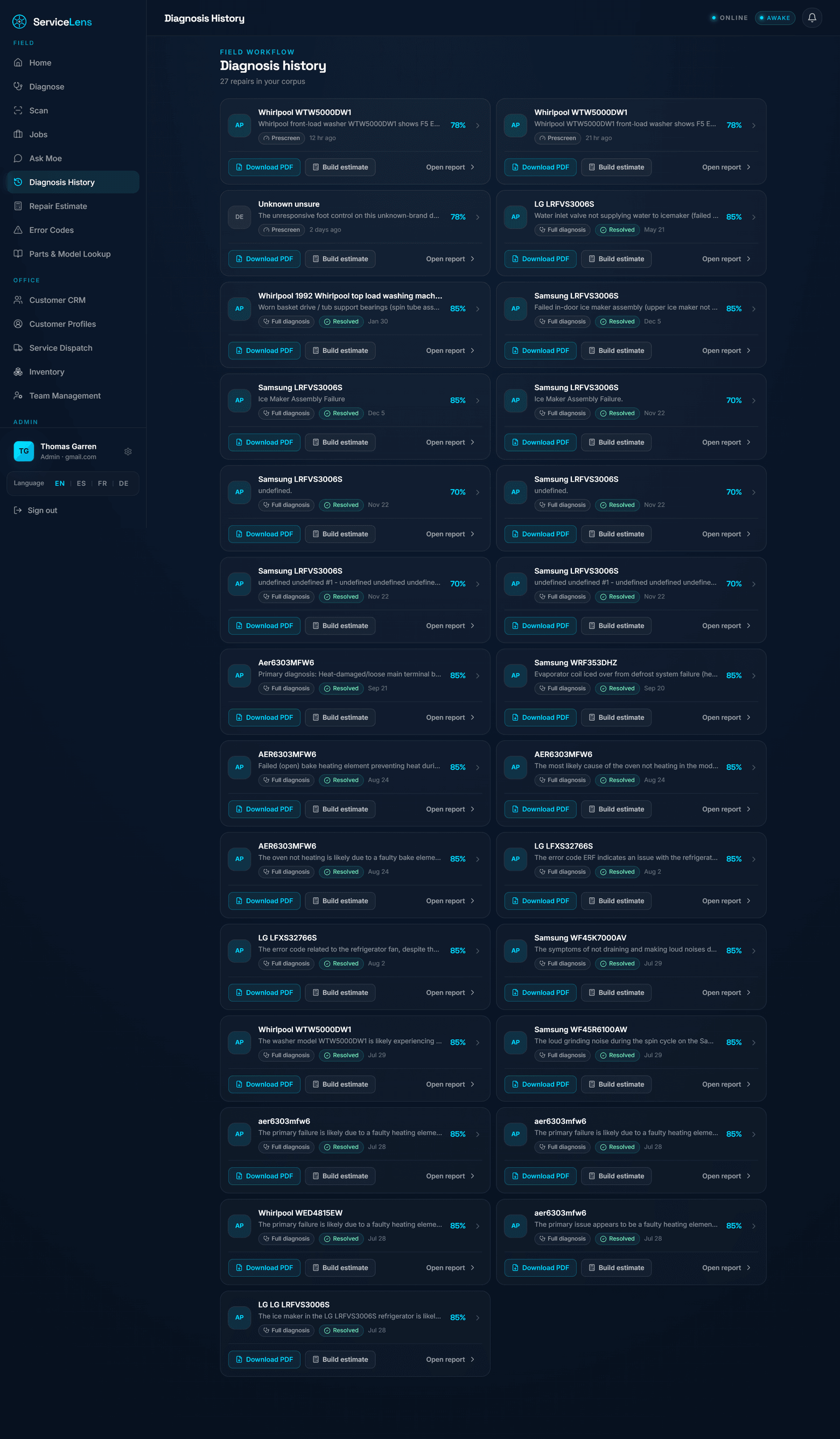
Every diagnosis is saved, scored, and re-openable — a searchable library of the shop's work. But it's more than a log: when a tech closes a job and records what actually fixed it, that confirmed fix re-grounds the next diagnosis. The corpus gets smarter with every job, across the whole platform.
diagbuddygo.com/app · Diagnosis History
"Diagnosis History" — every job saved, scored, and re-openable, with Download PDF and Build estimate on each.
1
A searchable library of every job
Make, model, symptom, confidence, and outcome — the whole floor's history, not a disposable chat log.
2
One-tap PDF & estimate per job
Re-open any report, hand a customer a PDF, or build the estimate — long after the truck has left.
3
Confirmed fixes re-ground the next call
A logged outcome ("replaced lid lock, F2-E2 cleared") becomes grounding for the next matching symptom. Why it beats competitors confirmed field fixes are the highest-quality signal there is — and they accrue to us, not to a static parts list.
1
Diagnose
part-first, grounded & verified
→
2
Order & fix
the verified OEM part, first try
→
3
Log the outcome
what actually fixed it, rated
→
4
Re-index
confirmed fix enters memory
→
5
Next call is smarter
grounded in a real, confirmed fix
Walkthrough · F
Ask Moe — conversational AI that draws the call.
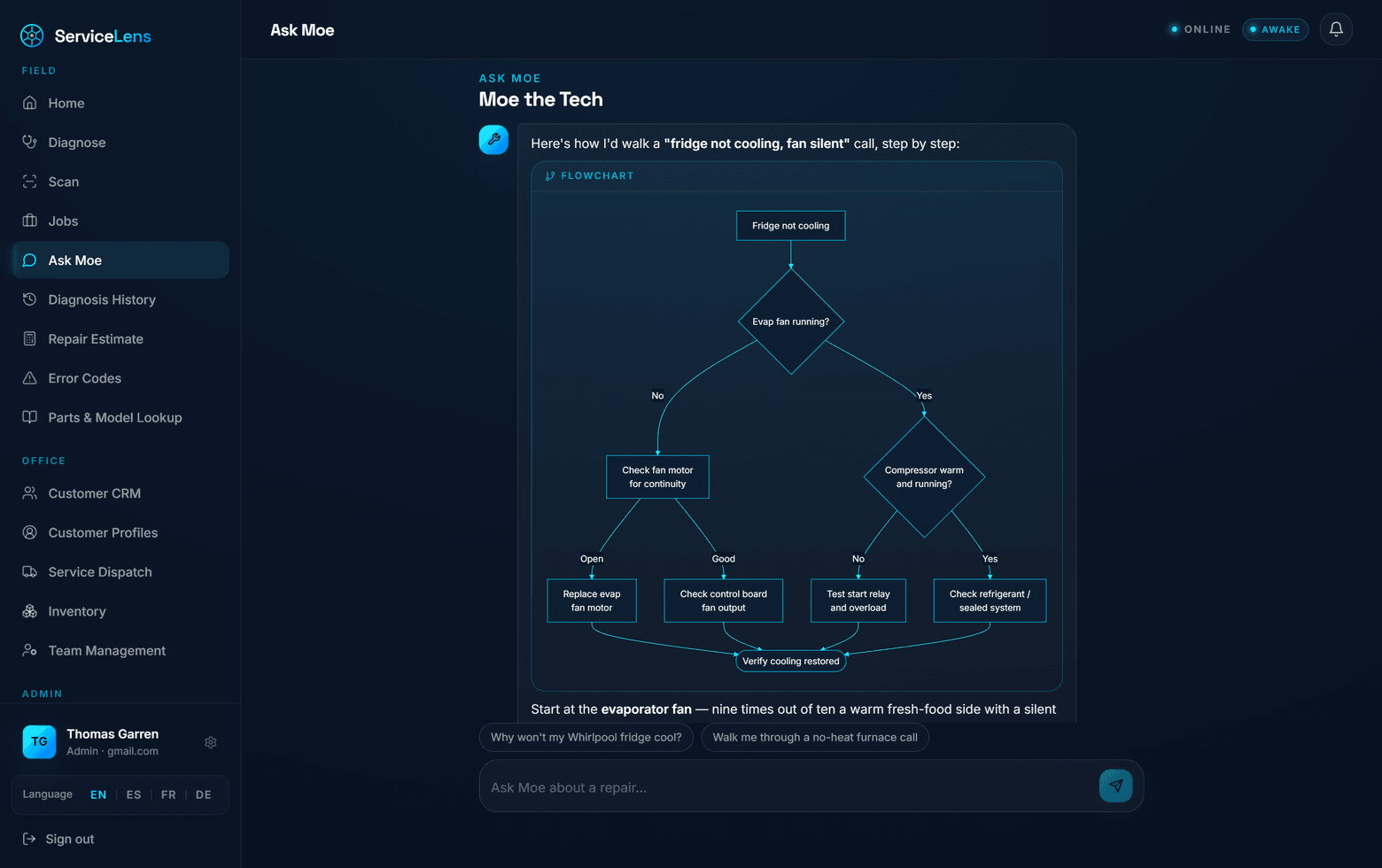
Sometimes a tech doesn't want a report — they want to talk it through. "Ask Moe" is a conversational senior-tech assistant that doesn't just answer in prose: it draws the decision tree. Moe renders flow and test diagrams so a tech can follow the call branch by branch — silently, on screen, no voice required.
diagbuddygo.com/app · Ask Moe
"Moe the Tech" — walks a "fridge not cooling, fan silent" call and renders the decision tree as a flowchart.
1
Renders real diagnostic flowcharts
Moe draws the decision tree — "Evap fan running? → No → check fan motor for continuity…". Why it beats competitors a wall of chat text vs a diagram a tech can actually follow at the unit.
2
Talks like a senior tech
"Start at the evaporator fan — nine times out of ten a warm fresh-food side with a silent fan…" — mentorship, not a search box.
3
Suggested next questions
"Walk me through a no-heat furnace call" — primes the less-experienced tech and keeps the conversation moving.
4
Silent & on-brand
No voice, ever. Why it beats competitors a tech reading a quiet screen looks professional in a customer's home; a voice bot does not.
Walkthrough · G
Built-in office tools — and a connected CRM.
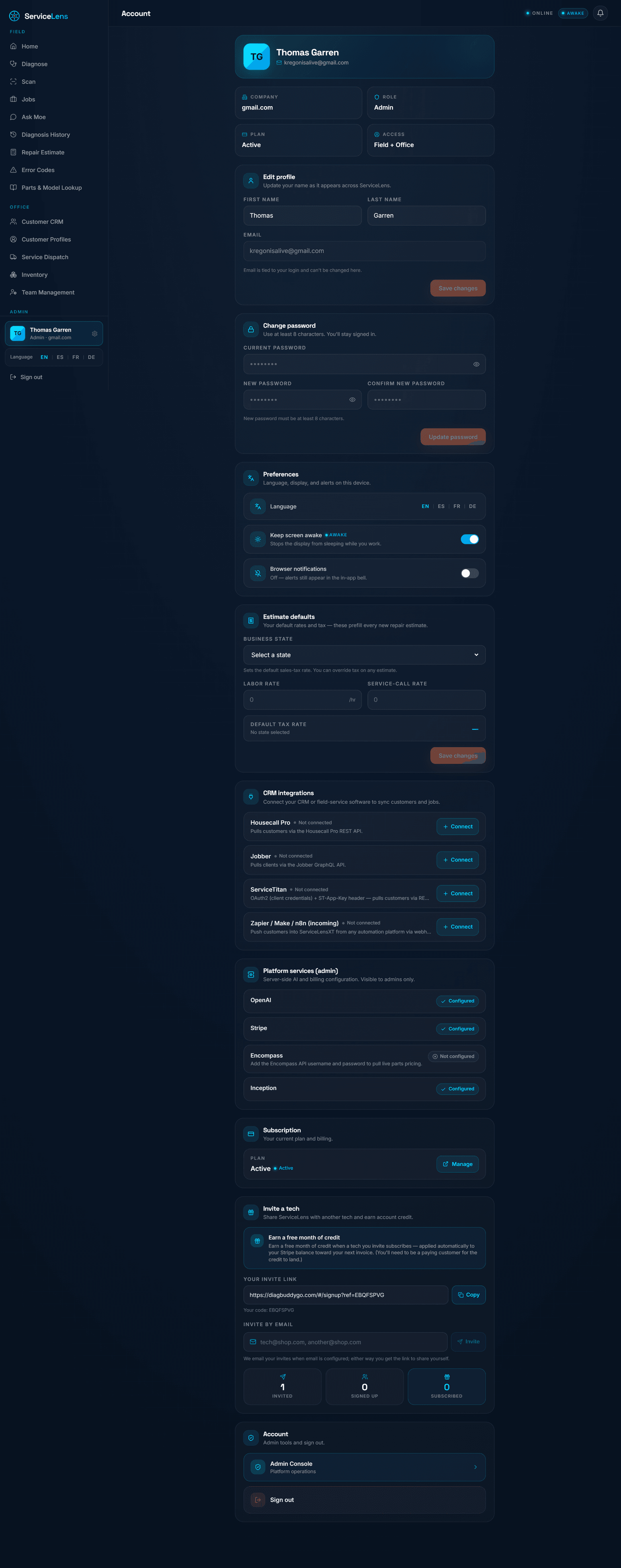
ServiceLens is the diagnostic brain — and it plugs into the rest of the shop's stack. Settings is where a shop sets estimate defaults, manages the subscription, invites techs, and connects the CRM and field-service platforms it already runs. Solo techs get a built-in CRM; teams push jobs straight into the tools they live in.
1
Estimate & shop defaults
Labor rate, tax, language, and preferences saved once — so every quote is consistent and fast.
2
CRM integrations — Housecall Pro, Jobber & more
Connect the FSM the shop already uses and push the diagnosed, quoted job straight into it. Why it beats competitors we don't fight the FSM — we feed it the diagnosis it can't produce on its own.
3
Built-in CRM for solo techs
No external platform required — customers, profiles, and dispatch live inside ServiceLens for the one-truck shop.
4
Invite techs & manage the seat
Add a crew member, hand off a referral credit, and manage the subscription — the whole team on one verified brain.
diagbuddygo.com/app · Account
"Account" — preferences, estimate defaults, CRM integrations, subscription, and invite-a-tech, all in one place.
Not a GPT wrapper. ServiceLens is a proprietary system from the Sophia XT AI lab. Compositional Routing is the production grounding engine today: it routes a query to the exact verified data across multiple corpora, then dual-verifies — input and output — every recommended part against that model's corpus before it ever reaches a tech.
Symptom / fault code
tech or office input
Nameplate Snap Scan
OCR → model identity
Model context
make · model · trade
Compositional Routing engine
verifies the input → routes to exact verified data across corpora → grounds the answer → dual-verifies every part vs the model's corpus → flags Verified vs Confirm-fit
Appliance
parts · codes · tests
HVAC
fault codes · parts
Mobile · Generator
guides · priced parts
Dental · Optometry
codes · parts
Exact verified OEM part
flagged Verified vs Confirm-fit
Cause + test-spec
provable diagnosis
Auto-estimate
OEM pricing from the corpus
Closed job → flywheel re-index
confirmed fix re-grounds the next diagnosis — the corpus compounds with every closed job
Dual input/output verification
Both the inbound model identity and the outbound part are checked against the corpus. Each part is flagged Verified (corpus-confirmed for this model) or Confirm-fit — killing hallucinated part numbers at the source.
Lab R&D foundation
Proprietary NCN routing + LCM architecture is the Sophia XT lab's research direction extending the engine — the foundation we're building toward, not a live production claim. Compositional Routing is what grounds answers today.
Model-agnostic
Works across leading model APIs. The defensibility is the verified corpus and the routing + verification layer — not any single vendor's model, so we ride every model improvement without being captive to one.
Why we're built differently
Corpus + verification, not an API wrapper.
Most "AI for trades" tools are a prompt around a general model. That's easy to build — and easy to copy. The hard, slow, expensive thing is a verified, exact-model parts-and-codes corpus per trade. That's the part competitors don't have, can't quickly clone, and the part that makes the answer right. Each new trade we finish widens the moat instead of just adding a feature.
API-wrapper competitor
A prompt around a general model.
Thin or no parts list. No model-level verification. Hallucinates part numbers. Forgets the job when the chat closes. Fast to ship — and just as fast for the next team to copy.
ServiceLens
A verified corpus + a verification layer.
Millions of verified OEM parts mapped to exact models, codes mapped to cause and test, dual-verified per answer, and a flywheel that compounds with every closed job. The data is the defensibility.
The data is hard to build
Verified, exact-model parts-and-codes data is slow, unglamorous, and expensive to assemble. That difficulty is the moat — it's why competitors run a thin list or none at all.
Verification, not vibes
We don't trust the model's first answer — we check it against the corpus and badge it. A part labeled "Verified" means corpus-confirmed for that exact model, not "the AI sounded sure."
It compounds
Every closed job re-grounds the next. A wrapper is a snapshot; ServiceLens is a system that gets more accurate the more it's used — a gap that widens over time.
Coverage & roadmap
Appliance is live & deep. The rest is rolling out.
We're honest about the map: appliance is live, deep, and exact-model-verified today. Other trades are expanding — each at its own stage. This is a roadmap, not a completed claim. The strategy is to go deep before going wide, then repeat the playbook trade by trade.
4.8M+
verified OEM parts
38,000+
models, exact-model-verified
2,200+
appliance error codes → cause & test
663
HVAC fault codes live · parts growing
Multi-trade roadmap — appliance live; the rest rolling out
Appliance
LIVE · deep & exact-model-verified
HVAC
663 fault codes live · parts growing
Mobile devices
phone/tablet guides + priced parts
Generators
standby parts + codes
Dental · Optometry
sterilizer codes+parts · optometry early
The expansion playbook: prove the depth in appliance, then port the same corpus-and-verification machine to the next trade. Because the engine is trade-agnostic, each new trade is a data project, not a rebuild — and every finished trade widens the moat rather than just adding a feature.
Measured, not marketed
Accuracy from a re-runnable benchmark.
These are precise figures from an internal benchmark that anyone on the team can re-run — not rounded marketing numbers. We report the strict floor alongside the best case, and we keep accuracy and confidence as separate measures on purpose.
81%
Strict component-match floor
The conservative lower bound — exact component match under strict scoring.
100%
On common faults
The everyday calls a tech actually makes resolve at the top of the range.
86%
Calibrated confidence
The model knows what it knows — confidence is calibrated, so techs can trust the flag.
Read it straight: 81% is the strict floor, not a ceiling; 100% is on common faults specifically; 86% is calibrated confidence, a separate measure from accuracy. We keep these distinct on purpose — conflating them (writing, say, "81% confidence") would be exactly the kind of overclaim this product is built to eliminate.
Where we sit
How ServiceLens stacks up.
Comparative and defensible — we don't claim to beat everyone at everything. We claim a specific, field-tech-first position: exact-part grounding, no voice, a large verified-OEM-parts corpus, and a self-improving flywheel, priced for SMB.
Capability
ServiceLens
Aquant
Aiventic
FSM (HCP / Jobber / ServiceTitan)
Manufacturer tools
Exact verified OEM-part grounding
Core moat — verified vs confirm-fit
Industrial focus
Leaner corpus
Not a diagnostic engine
One brand only
Target user
Field tech & SMB shop
Enterprise / industrial & medical fleets
Field service
Dispatch & invoicing
That brand's techs
Interaction model
Silent text + diagrams
Complex enterprise UX
Voice-heavy
Forms / scheduling
Portal / lookup
Office-to-tech prescreen
Yes — part before dispatch
Varies
—
—
—
Self-improving job flywheel
Yes — confirmed fixes re-index
Knowledge mining
—
—
—
Auto-estimate & quote
Built in
—
Limited
Strong
—
Pushes into FSM / CRM
HCP + Jobber wired
Integrations
Some
is the FSM
—
Brand / trade breadth
Brand-agnostic, multi-trade
Industrial verticals
Field-service
Trade-agnostic ops
Single brand
Positioning
Affordable · field-first
Enterprise · premium
Mid-market
Operations backbone
OEM support
Comparisons reflect each vendor's primary public positioning; capabilities evolve. ServiceLens is complementary to FSM platforms — the AI diagnostic brain they lack, that pushes work into them.
The narrative
A different lane than each one.
Defensible, comparative positioning — not absolute "we beat everyone." Against each category we hold a specific, ownable advantage.
vs Aquant
Aquant targets enterprise, expensive, complex industrial and medical fleets. ServiceLens is affordable and field-tech-first — appliance/HVAC/SMB, silent with diagrams, and a stronger office-to-tech prescreen that gets the part right before the truck rolls.
vs Aiventic
Aiventic leans voice-heavy on a leaner corpus. ServiceLens is no-voice, with a larger verified-OEM-parts corpus, exact-part grounding, a self-improving flywheel, and built-in auto-estimate — the depth and the close-the-loop, not just the conversation.
vs FSM platforms (HCP / Jobber / ServiceTitan)
These run scheduling, dispatch, and invoicing — not diagnosis. ServiceLens is the complementary AI diagnostic brain they lack, and it pushes work directly into them (HCP + Jobber wired today; ServiceTitan is an FSM we push into, not a live integration claim).
vs manufacturer tools
OEM tools are locked to one brand. ServiceLens is brand-agnostic and far broader — one tool across makes, models, and trades, instead of a different portal per manufacturer.
Built for the field
The details that matter at the customer's door.
A diagnostic tool lives or dies on whether a tech will actually use it on the job. Every product decision here is a field decision — made by someone who has run the truck.
Dark-mode, mobile-first
Built phone-first for an all-day device — the dark navy theme is easy on the eyes in a dim basement and easier on the battery in a long shift.
Silent — no voice, ever
Deliberate, not missing. A tech tapping a quiet screen looks professional in a customer's home; a voice assistant would not. Text + diagrams keep the tech in control.
Ask Moe + diagrams
Conversational senior-tech mentorship that draws the decision tree — Mermaid-style flow and test diagrams a tech can follow branch by branch.
Desktop dispatch
The office gets a full dispatch view of the same data — pre-diagnose, assign, and track jobs without a separate tool or a second login.
Office → tech pre-screen
The free prescreen lets the office pre-diagnose and recommend the part before dispatch — so the truck rolls stocked right the first time.
Multilingual UI
EN · ES · FR · DE in the interface — built for the real, multilingual makeup of a modern field-service crew.
Pricing
One simple seat. It pays for itself in a trip.
No enterprise procurement, no per-feature upsell maze. One flat price per tech, a free trial to prove it, and a value math that's hard to argue with: avoid a single wrong-part second-trip and the seat is paid for many times over.
$34.99
per tech / month
Everything in the walkthrough — diagnose, the verified part, auto-estimate, history & flywheel, Ask Moe, and connected CRM. One price.
3-day free trial no commitment
The value math
A single avoided wrong-part second trip typically costs a shop more than a year of one seat.
Higher first-time fix rate means more jobs per day per truck — the same crew, more revenue.
Fewer callbacks & bad reviews — reputation protected, repeat business kept.
Newer techs perform like seniors on day one — onboarding and training cost drops.
Priced for the SMB field-service shop, not enterprise procurement. Scale is just seats.
ServiceLens
By Sophia XT
Appliance live · multi-trade rolling out
Why it wins
The exact part. Verified. Every time.
A real diagnostic engine — grounded in a verified OEM corpus, dual-checked per model, and getting smarter with every closed job — built by someone who has actually run the truck.